NSB3 Review: Multi-Store Sneaker Bot Architecture & Guide

This technical NSB3 review examines why a unified multi-store checkout suite is the only sneaker automation tool many collectors ever need to study. Built for macOS and Windows, the third-generation architecture coordinates task groups across more than 100 Shopify storefronts. It also supports regional Footsites and brand draw apps. The desktop client pairs a modular dashboard with residential proxy routing and CAPTCHA harvesting workflows.
- Supported Storefronts: Covers 100+ Shopify boutiques, Nike SNKRS, Adidas Confirmed, JD Sports, Finish Line, and ASOS apparel drops.
- Shopify Rate Limits: Manages checkout polling within Shopify’s 4 requests per second standard API cap and 40 requests per second Plus limit per developer docs.
- SNKRS Draw Windows: Aligns account entries with 10-minute randomized ballot windows on $250 retail retro launches that trade near $500 on resale markets per market data.
- Task & Proxy Ratios: Supports 1:1 and 2:1 proxy-to-task ratios across ISP and residential subnets to prevent HTTP 429 rate-limit blocks.
How Does the Third-Generation Dashboard Organize Multi-Store Task Groups?
Modern sneaker releases require managing dozens of store monitors, billing profiles, and proxy lists simultaneously. Readers learning what sneaker botting involves often struggle when separate windows clutter their screen. The third-generation interface consolidates tasks, proxies, billing profiles, and analytics into a single dark-mode workspace. Users group checkout tasks by retailer so Shopify, Footsites, and brand draws remain clearly separated.
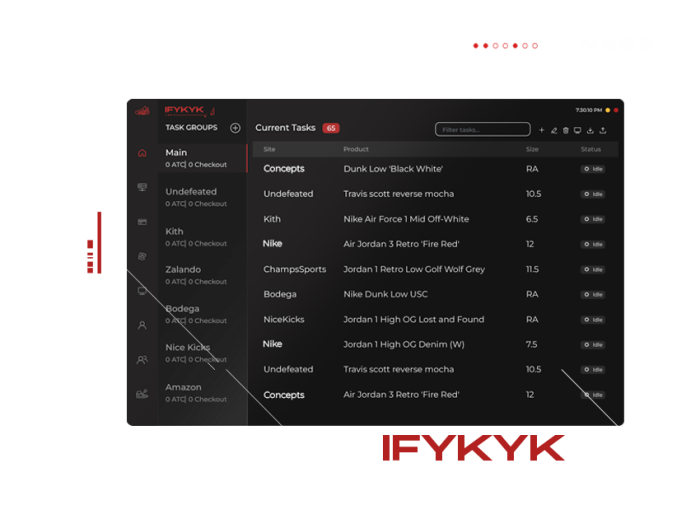
Each task group lets the operator assign specific size ranges and SKU keywords. Users also set custom delay intervals measured in milliseconds. Color-coded status indicators show whether a task is waiting for product restocks or submitting shipping details. They also confirm when payment processing completes. Built-in release calendars and Discord webhook notifications help collectors track checkout logs across 10 to 50 concurrent tasks.
Which Sneaker, Apparel, and Collectible Sites Do the Checkout Modules Cover?
Single-site scripts only target one retailer at a time. By contrast, all-in-one software spans multiple e-commerce engines simultaneously. When collectors evaluate the best sneaker bots, site coverage determines whether one setup handles both morning draws and afternoon restocks. Core footwear modules support Nike SNKRS, Adidas Confirmed, Finish Line, JD Sports, Champs Sports, and Foot Locker. They also cover more than 100 global Shopify boutiques.

Beyond footwear, the software includes modules for streetwear and fashion storefronts such as Supreme and ASOS. Collectors who diversify into high-demand collectible releases also use Shopify and specialized retail modules. Those modules target Pop Mart Labubu figures, Mattel Creations drops, and trading card restocks. Supporting 100+ stores inside one desktop client eliminates the need to switch tools between releases.
How Do Cloudflare Bot Filters and CAPTCHA Challenges Work on Drop Day?
Major footwear and apparel retailers deploy layered traffic filters to block automated scraping during limited launches. According to Cloudflare’s technical bot documentation, edge servers inspect TLS fingerprints and HTTP header order on every request. They also evaluate IP reputation scores before serving product pages. Storefronts trigger interactive verification puzzles before allowing a visitor to enter the checkout queue.
Understanding how CAPTCHA verification works is essential for anyone running Shopify or Footsite tasks. During a high-volume drop, boutiques serve Google reCAPTCHA v2, reCAPTCHA v3 score checks, or hCaptcha prompts. These challenges appear on both the product page and the checkout throttle. Pre-warming Gmail accounts and maintaining clean browser cookies helps harvesters process tokens smoothly. Clean residential IPs also reduce repeated security prompts.
| E-Commerce Platform | Primary Drop Mechanism | Rate Limit or Timer Rule | Recommended Proxy Type |
|---|---|---|---|
| Shopify Boutiques (100+ Sites) | First-come queue & bot protection | 4 req/sec standard; 40 req/sec Plus API | Low-latency ISP & residential proxies |
| Nike SNKRS App & Web | LEO queue (2–3 min) & DAN Draw | 10-minute randomized ballot window | Clean static residential IPs (1:1 ratio) |
| Footsites (FLX / JD / Finish Line) | Virtual waiting room & queue-it | 2,500 ms to 3,500 ms monitor delays | Rotating residential proxy pools |
| ASOS & Collectible Storefronts | Restock monitors & flash drops | 3,000 ms polling interval guideline | Mixed ISP and residential subnets |
How Do Shopify Rate Limits and SNKRS Draw Timers Shape Task Strategy?
Every e-commerce backend enforces strict request ceilings that dictate how users configure monitor and checkout delays. According to Shopify’s official API rate limit documentation, standard stores cap traffic at 4 requests per second. Meanwhile, Shopify Plus enterprise merchants scale up to 40 requests per second (400 GraphQL points per second). Polling a boutique faster than 2,500 to 3,500 milliseconds from one IP triggers temporary HTTP 429 bans.
Balancing monitor delays between 2,500 and 3,500 milliseconds across rotating residential proxies keeps checkout tasks below Shopify’s 4 to 40 requests-per-second rate limits.
Brand launches follow a different allocation model entirely. According to Nike’s official SNKRS Draw guide, flagship collaborations open a timed 10-minute ballot window. Entry timing within that 10-minute window does not alter selection odds. When a $250 retail Jordan retro trades at a $500 resale average per market data, collectors combine 1:1 residential proxies with verified profiles to enter cleanly.
How Do Multi-Store All-in-One Sneaker Bots Compare Across Core Modules?
Collectors researching a comprehensive NSB3 review always compare how leading all-in-one suites handle different retail engines. In the multi-store category, experienced operators evaluate Valor AIO, Cybersole, Stellar AIO, and NikeShoeBot based on target storefronts and operating systems. Some tools focus heavily on Shopify and Footsites. Others emphasize big-box retail giants or European apparel boutiques.
Reviewing verified sneaker bot checkout logs shows that consistent results depend on matching the right module to each drop. For example, Shopify drops at Kith, Undefeated, and DSM require local monitor tasks paired with pre-carted session cookies. Meanwhile, regional Footsite restocks and ASOS apparel drops rely on rotating residential proxy pools. Those pools distribute requests across hundreds of clean IP addresses during peak traffic.
| Automation Platform | Operating System Support | Primary Retail Modules | Task Management Architecture |
|---|---|---|---|
| Valor AIO | Windows & macOS | Shopify, Footsites, Finish Line, JD Sports | Task groups with built-in monitor pooling |
| Cybersole | Windows (with mobile companion) | Shopify, Supreme, Footsites, European boutiques | Profile-linked task lists and webhook logs |
| Stellar AIO | Windows & macOS (server recommended) | Amazon, Walmart, Target, Shopify, Footsites | Session-based retail and sneaker task queues |
| NikeShoeBot | Windows & macOS native client | SNKRS, Shopify, Confirmed, Footsites, ASOS | Modular dark-mode task groups and harvesters |
How Do Collectors Configure Proxies and Billing Profiles Before Launch?
Even the most capable software requires disciplined pre-release preparation twenty-four hours before a major drop. First, operators split their proxy lists into two distinct groups. They use datacenter or ISP proxies for low-latency Shopify monitoring. They reserve residential proxies for queue-based Footsite and brand launches. Assigning a 1:1 proxy-to-task ratio on ballot releases prevents multiple accounts from sharing the same IP address.
Second, buyers verify that each billing profile uses a unique virtual or physical payment card and an accurate shipping format. Third, operators test their proxy ping times against the target store’s server region (such as Ashburn, Virginia) the night before launch. Running two or three test tasks on an in-stock item confirms that billing profiles, webhooks, and harvesters are properly linked.
What Proxy-to-Task Ratio Works Best for Shopify and Brand Drops?
For randomized brand draws, always use a strict 1:1 ratio so every account uses a unique static residential IP. For Shopify drops, a 1:1 or 2:1 ratio with dedicated monitor proxies prevents HTTP 429 rate limits.
Does the Desktop Client Run Natively on Both macOS and Windows?
Yes, the desktop application installs natively on both macOS and Windows systems. Users can also run it on a remote Windows Virtual Private Server (VPS) for lower network latency.