Running a sneaker bot without a dedicated proxy pool is a guaranteed way to get your home internet temporarily banned from major retail sites before a shoe even drops. While your bot handles the heavy lifting of automating checkout steps, adding items to carts, and filling out payment forms, proxies provide the essential network disguises needed to make those automated tasks look like regular human shoppers.
Without sneaker botting proxies, retail security systems will instantly detect your bot, block your IP address, and completely lock you out of the release. To understand why proxies are the most critical component of a successful botting setup, we have to look at how retail websites defend against automated software and what happens behind the scenes when you press “start” on your tasks.
The Reality of Botting Without Proxies
When a normal shopper visits a website to buy shoes, their computer sends a few data requests every second. Like loading an image, clicking a button, or submitting an address. Retail web servers consider this slow, linear traffic completely normal.
When you launch a sneaker bot, you are typically running dozens or even hundreds of tasks at the exact same time. If you do not use proxies, every one of those tasks routes through your home Wi-Fi router. Instead of sending two or three requests per second, your single home IP address suddenly blasts the store’s server with hundreds of rapid-fire requests.
Modern e-commerce sites use advanced security systems or Web Application Firewalls (WAFs) to monitor incoming traffic. When a WAF sees 50 simultaneous checkout attempts coming from one home IP address, it immediately flags the activity as a bot or a malicious attack.
Within seconds, the security system will trigger a specific sequence of failures:
- Rate Limiting (HTTP 429): The server tells your bot “Too Many Requests” and temporarily freezes your connection. Your tasks will stall and fail to add the shoes to your cart.
- Access Forbidden (HTTP 403): The firewall blocks your connection entirely.
- The Local Network Ban: Your home IP address is blacklisted. So your bot fails to secure the sneakers, and anyone trying to browse that store from your home Wi-Fi will also see an “Access Denied” page.
Why Proxies Are the Ultimate Solution
A proxy acts as a middleman between your computer and the retail website. When you assign a proxy to a bot task, the task sends its request to the proxy server first, and the proxy forwards that request to the store. The store’s security system only sees the proxy’s IP address, keeping your real home IP completely hidden.
This middleman approach solves the biggest technical hurdles in sneaker botting:
- Distributing Your Tasks (The Clone Effect): If you want to run 100 checkout tasks to maximize your chances on a limited release, you need 100 different IP addresses. By assigning one proxy to each task, you distribute your network traffic across the country. To the retailer’s security system, your 100 tasks simply look like 100 completely different people shopping from 100 different houses. This prevents rate limits and keeps your tasks running smoothly.
- Bypassing Region Locks: Many high-profile sneaker releases are geo-restricted. A store might only allow checkouts from European IP addresses, or a specific boutique might only ship to buyers within their state. Proxies allow you to virtually relocate your tasks. By purchasing proxies located in London, you can successfully bot a European-exclusive drop from your desk in New York.
- Reducing Network Ping (Latency): In sneaker botting, speed is everything. Limited releases often sell out in under three seconds. If your home network is located in Texas, but the retailer’s servers are in Virginia, data takes time to travel back and forth. By purchasing high-quality proxies hosted in Virginia data centers, you drastically reduce the time it takes for your bot to communicate with the store. Lower ping times mean faster checkouts.
Choosing the Right Sneaker Botting Proxies
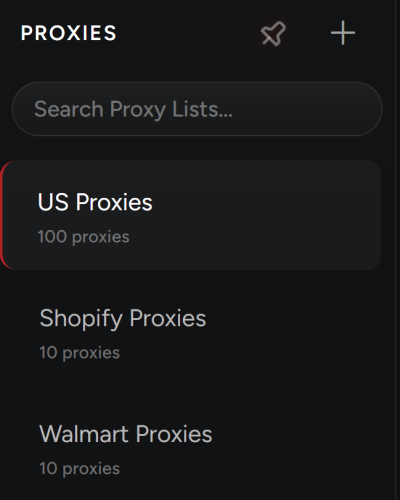
Not all proxies are created equal, and using the wrong type of proxy on a strict website will still result in your tasks getting blocked. Proxy providers generally offer three main types of networks, each suited for a specific botting strategy:
- Residential Proxies: These are real IP addresses provided by standard consumer internet companies (like AT&T or Comcast). Because they look exactly like average home connections, retail security systems trust them highly. They are perfect for heavily protected sites that use raffles, draws, or virtual waiting rooms. They are usually sold by the gigabyte, meaning you pay for the data your bot consumes. Best used for sites like Nike (SNKRS App and Website) & Footsites (Foot Locker, Champs Sports, Kids Foot Locker).
- ISP Proxies (Static Residential): ISP proxies offer the best of both worlds. They are hosted in lightning-fast enterprise data centers. But they use the IP addresses of consumer internet providers. They offer incredible speed with very high trust, making them the absolute best choice for sites that rely on “first come, first served” speed, such as Shopify-hosted boutiques.
- Datacenter Proxies: Cloud hosting providers generate these in bulk. While they are incredibly fast and cheap, retail security systems know that real humans don’t shop from Amazon Web Services server racks. Datacenter proxies are easily detected and blocked during checkout. You should only use them for monitoring tasks that track stock changes in the background. You can run them on Shopify sites (For Restock Monitoring Only), like restocks on Kith or Undefeated, and also for CAPTCHA Farming (Google/YouTube) or any site with zero bot protection.
Understanding how to pair the right proxy type with your target site is a fundamental skill. A top-tier sneaker bot is useless without high-quality network routing, and investing in good proxies is just as important as configuring your task delays and billing profiles correctly.

Can I run just a few tasks without proxies to save money?
It is highly discouraged. Even running two or three concurrent tasks from your home IP can trigger rate limits on strict sites. If your home IP gets temporarily banned, you won’t even be able to attempt a manual checkout on your phone.
What is the “1:1 Ratio” everyone talks about?
The 1:1 ratio means assigning exactly one proxy IP to one active bot task. If you assign the same proxy to three different tasks, you are forcing all three tasks through one IP, which defeats the purpose of the proxy and will result in that IP getting blocked.
Are free proxies safe to use for sneaker botting?
Never use free or public proxies. They are incredibly slow, already banned by every major retail security system, and highly insecure. Free proxies can intercept your checkout data, exposing your credit card information and personal details to hackers.
My tasks are getting “HTTP 429” errors. What does this mean?
An HTTP 429 error means “Too Many Requests.” It indicates that the specific proxy IP attached to that task is sending requests too fast and has been temporarily rate-limited by the store’s firewall. You will need to increase your bot’s task delays or swap to a cleaner proxy.
Why do people recommend ISP proxies for Shopify sites?
Shopify sites usually sell out in seconds, so you need extreme speed to secure a checkout. ISP proxies are hosted in fast data centers close to Shopify’s servers. Allowing them to send checkout payloads much faster than standard residential proxies while still appearing as trusted consumer connections.
What happens if a proxy gets banned right in the middle of a drop?
If a proxy is banned, the specific task attached to it will fail and stop working. However, if you use a proxy pool, the rest of your tasks running on different proxies will remain unaffected and keep trying to check out.