
Alright peeps, today we’re getting right down to business! We already discussed the legitimacy of Whatnot, and now we’ll take it a step further. If you’re seriously considering becoming a reseller, then it’s time for you to learn the basics. We’re gonna tell you how to sell on Whatnot, and it’s gonna be all the info you need from A to Z! So, let’s get started with it and get you ready to make money online, shall we?
How to Sell on Whatnot – A General Breakdown
Okay, if you’re reading this, then you probably set your mind on becoming a reseller. And if you wanna learn how to sell on Whatnot, it’s a pretty simple process! Here are the main steps that you need to follow:
- Create a Whatnot account
- Apply to become a seller
- Schedule a show
- Prepare for the show
- Go live
- Sell your items and make money!
If you wanna check out these steps in detail, this guide broke it down for you!
Extra Details on How to Sell on Whatnot
Part 1 – Apply to Sell
- Start Seller Application

All you gotta do to get started is open the app and tap the + Sell button at the bottom of your screen. Then you tap Get Started, and you’re off to the application!
- Agree to Community Guidelines

Of course, you cannot operate and sell on any platform unless you agree to its terms and conditions. That’s where you get to review the app’s guidelines and agree to them.
- Choose Your Seller Category

Are you a sneaker, figurine, or trading card reseller? Well, this is the step where you choose the main category that you will be operating in.
- Selling Experience

If you already have some resale experience, here is the place to say so. You gotta choose whether you’re still new in the game or a resale veteran!
- Monthly Sales Revenue

Following up on the previous question, you can let the platform know how much you make on average per month from resale.
- Other Sale Platforms

And if you already have resold anything previously, you gotta mention which other platforms you’ve used to do so.
- Social Media Links

Of course, nobody becomes a solid reseller without becoming relatively known in the resale circles. So, you should mention your social media links through which you resell/promote your items.
- Return Address

On the more technical side of things, you should give a return address for the platform. It’s very important that you use your full legal name here.
- Complete Application

Finally, this is the last step where you complete your application and move on to the next step! If you wanna check out a more detailed breakdown of the application process, check this out. Now, let’s move on to how to sell on Whatnot since you’re in!
Part 2 – How to List Your Items
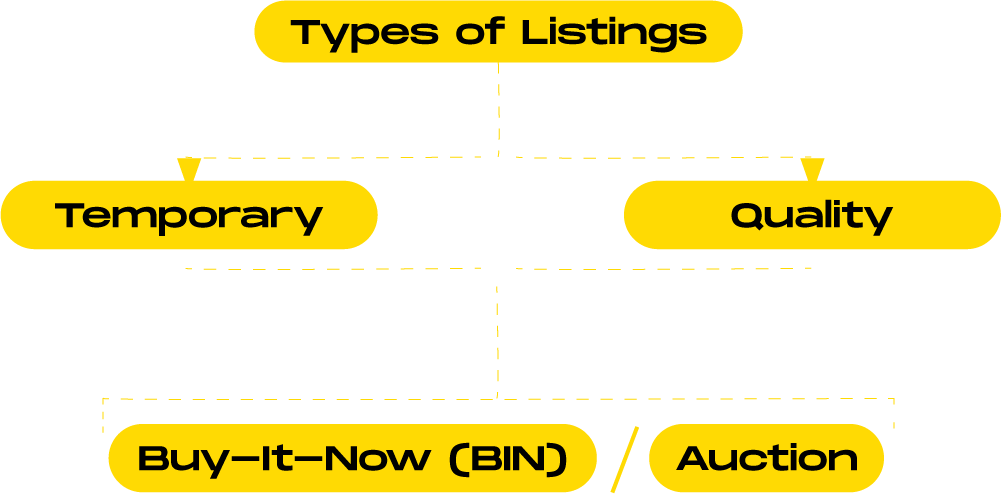
One of the most important things to remember here is that there are two different types of listings. The two types are as follows:
- Temporary Listings: These items will only appear when you start your live show when you list them. Once the show ends, these items will disappear.
- Quality Listings: These items will require more detailed descriptions. However, they stay active after the live show ends, which gives your items more visibility!
Now, both of these listings can be set into two categories, or types of sales:
- Auction: This is a more common category for temporary listings during live show sales.
- Buy-It-Now (BIN): This one features fixed prices, and sellers use it during both live shows and beyond.
Now that you know how to sell on Whatnot, it’s time to take your knowledge and apply it! Whatnot has already proved that it’s a great place for you to sell your sneakers, collectibles, and more. But to get to that point, you need to score these items for retail. Luckily, we have the guide for that too. Godspeed!