You know the familiar disappointment of 10:00 AM drops. You refresh the page and instantly hit a “Sold Out” screen. According to industry data, everyday sneaker shopping is often impossible because standard website navigation is simply too slow. Winning highly anticipated sneaker releases requires technical preparation, not blind luck. While average buyers wait in a website’s crowded digital lobby, professionals use sneaker links as hidden digital shortcuts. These direct paths bypass the homepage entirely, taking users straight to the checkout line.
Fortunately, mastering this secret landscape does not require complex coding. By tracking reliable sneaker news, you will uncover how digital monitors, early access URLs, and insider alert groups actually work. These three tools transform frustrated buyers into prepared collectors.
What Exactly Are Sneaker Links?
You’ve likely experienced the frustration of the spinning loading wheel at exactly 10:00 AM. When relying on a public link from a retailer’s homepage, you are essentially walking through a digital store’s crowded front lobby. Other shoppers are clicking the same menus, causing massive delays when seconds matter most.
To avoid this traffic jam, tech-savvy buyers rely on sneaker links. Instead of waiting for a website to load heavy graphics, these shortcuts use a shoe’s specific “backend product ID”, the secret computer code the store uses to identify the item. This bypasses the front lobby entirely, opening a faster, digital side door.
The most powerful version of this tool involves direct-to-cart checkout URLs. By clicking one, the shoe is instantly placed in your bag, and you are pushed straight to the payment screen, skipping multiple steps.
How to Find Early Sneaker Links Before They Go Live
Knowing a digital side door exists is only half the battle; you still need the exact address. Retailers assign a unique barcode, called a Stock Keeping Unit (SKU), to every shoe weeks before it drops. By identifying this code early, tech-savvy buyers can construct the exact URL needed to bypass the main homepage.
Searching manually by constantly refreshing a webpage is too slow, so experts use automated software. Think of these programs as tireless digital guards watching a store’s invisible files around the clock. By extracting hidden shoe product IDs from the retailer’s system, they instantly generate direct checkout paths without human hesitation.
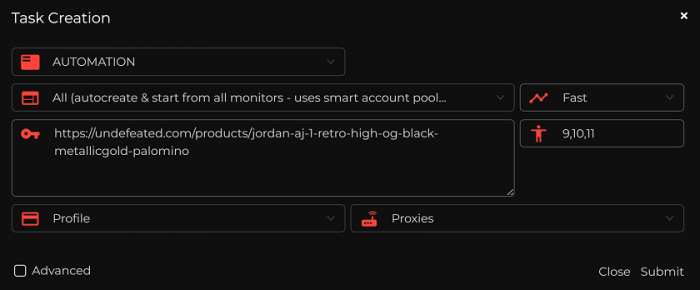
You do not need to be a programmer to benefit from these real-time footwear release monitors. Everyday shoppers get the same updates by tracking restock alerts on X, where dedicated accounts broadcast sneaker release links the second a shoe drops. To get started, try following these three free accounts:
- @SneakerShouts: Reliable for mainstream, highly anticipated drops.
- @SoleLinks: Excellent for providing direct checkout paths.
- @SNKR_TWITR: Ideal for catching unexpected daytime restocks.
These mobile notifications ensure you know the exact moment a shoe becomes available. Yet, even with public alerts buzzing on your phone, some buyers still beat you to the final payment screen by accessing private communities.
Inside Cook Groups – How to Have a 10-Second Head Start
Clicking an X alert instantly rarely guarantees a win. Serious buyers hang out in private Discord chat rooms, getting a crucial head start. The best Discord sneaker cook groups act as exclusive clubhouses that consolidate information into one easy dashboard. A good group provides four essential features:
- Early links to secret checkouts
- Site monitors that watch for restocks
- An upcoming hype footwear release calendar
- Community support from seasoned buyers

Beyond shared links, these communities teach tactics to bypass store security. If a retailer catches you constantly refreshing a page, they ban your internet connection. To avoid this, pros use high-speed proxies for drops. Think of these as digital masks; they make one shopper look like dozens of people logging in from regular household neighborhoods, stopping the store’s digital bouncer from kicking them out. If you wanna learn more about them, check this out.
You must decide if paying for this access is worth it. Grasping the line between fair manual copping vs sneaker botting helps casual fans realize they can still win without cheating. Beyond community resources, success depends heavily on knowing the specific retailer’s platform.
SNKRS vs. Shopify – How Different Drop Types Change Your Strategy!
Knowing where sneaker links lead is only half the battle. Independent boutiques typically use Shopify, creating first-come, first-served digital traffic jams. While entirely bypassing virtual queues on release day is nearly impossible without professional software, everyday shoppers can still compete by clicking the exact second the product loads.

Major brands handle high-demand shoes differently to prevent site crashes. Footwear raffle entry systems function by putting your name into a digital hat instead of forcing you to stand in a crowded digital line. Spotting specific Nike SNKRS app drop types changes your strategy completely.

Regardless of the store’s rules, a sluggish computer guarantees a frustrating loss. Minimizing latency during the checkout process, which just means reducing the technical delay between your mouse click and the store’s response, keeps you in the game. You can easily accomplish this by using a wired internet connection and pre-saving your payment details.
Beyond Sneaker Links – The Sneaker Drop 3-Step Plan
You no longer have to blindly chase sneaker trends or overpay for your favorite sneaker styles. Instead, safely secure retail sneaker deals using your ‘T-Minus 1 Hour’ checklist:
- Verify links to avoid phishing scams.
- Log in to accounts early.
- Check monitor notifications.
You now hold the map to the digital side doors. Beating the crowd doesn’t require a bot, just better information. By spotting sketchy traps and using reliable shortcuts, you are ready to confidently navigate your next drop day. Oh, and having NSB by your side will make your shopping experience even better. So get your copy today and get ready to score. Godspeed!