NikeShoeBot guide
MediaMarkt guide
NikeShoeBot supports the following regions for MediaMarkt:
MediaMarktAT, MediaMarktPL, MediaMarktES, MediaMarktBE, MediaMarktDE, MediaMarktNL, MediaMarktHU, MediaWorldIT, SaturnDE.
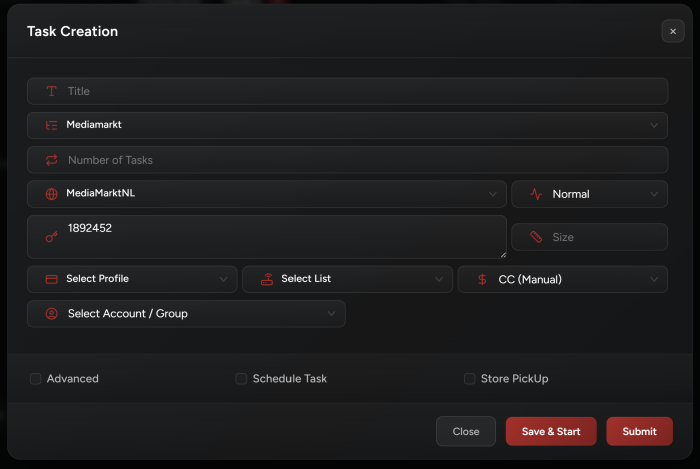
Accounts Setup
You need to add accounts to run MediaMarkt.
-
Go to NikeShoeBot Accounts tab.
-
Create a new group (from top left corner).
-
Select “Other” as group type.
-
Once done, you may add your accounts by inserting the emails and passwords.
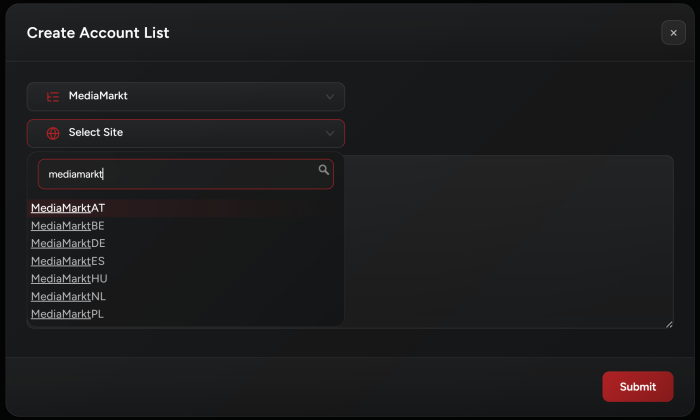
Task Creation
-
After adding your accounts in the Accounts tab, go to the Tasks tab.
-
Input:
Add item ID as task input.
For example, if the item URL is: https://www.mediamarkt.de/de/product/_pokemon-12483-pkm-me02-top-trainer-box-sammelkarten-3012213.html
The item ID will be:
3012213 -
Accounts:
Select your accounts by selecting one of the MediaMarkt account groups you’ve already created in Accounts tab.
-
Size:
Not required for almost all items.
-
Payment Modes:
All of the 3 available payment modes, CC (Manual), PayPal (Manual), and Ideal (Manual – NL only) work the same way: NikeShoeBot will generate and send a checkout link to your discord webhook (if you have one) and it will show it in the task logs. You need to manually paste this link in your browser so you can complete the checkout.
-
Quantity:
You may specify the quantity by clicking the “Advanced” field when creating your task and entering the desired quantity.
MediaMarkt Modes
- Running
Monitortasks without correspondingWatchtasks is ineffective. Watchtasks require activeMonitortasks; otherwise, they will show no Monitor task available for the given item code.
2. Monitor Mode:
-
Purpose: Continuously checks the availability of specified Item Code(s).
-
Restock Detection: When a restock is detected, a monitor task will notify all associated
Watchtasks, allowing them to:-
Proceed to checkout.
-
Send the order URL via webhook to Discord and also show it in task logs.
-
-
Proxy Use: A proxy list with high-quality proxies is recommended for running Monitor tasks.
-
Monitoring doesn’t require an account.
-
Multiple Items’ Codes:
-
You can add
Multi Codesusing the+button. -
The task monitors all SKUs at once, depending on the number of proxies in the assigned proxy list.
-
The number of proxies should match or exceed the number of SKUs being monitored.
-
Watchtasks will be waiting for monitor tasks. Once notified,Watchtasks will start working instantly.
-
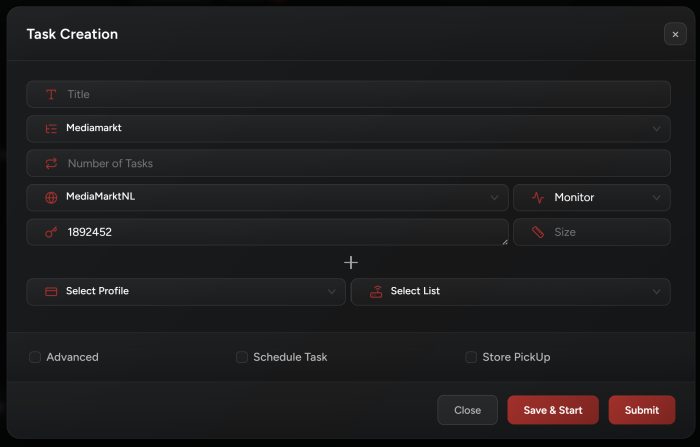
3. Watch Mode:
-
Purpose: Waits for a matching
Monitortask to detect a restock of a specific item. -
Triggering:
-
Once a restock is detected, the
Watchtask proceeds to checkout. -
You can add multiple SKUs to a
Watchtask (same as the Monitor task above).
-
-
Persistence:
-
Watch tasks run continuously until manually stopped.
-
After checkout, the task automatically restarts to maximize the chances of securing multiple restock checkouts.
-
-
Auto-Restart:
-
If the task fails to checkout within 2 minutes, it auto-restarts to attempt checkout again.
-
-
Watch tasks will also listen to Discord monitors too: Whenever a discord monitor pings, if you have the SKU already being watched in any of your watch tasks, the watch task will also be triggered and starts attempting to checkout.
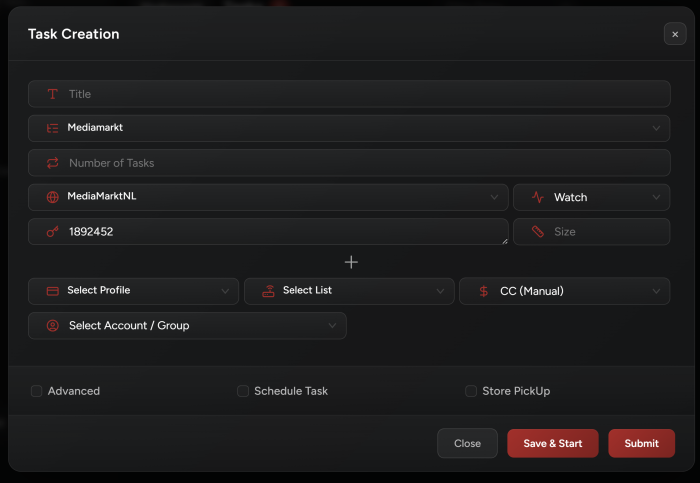
Note1: Task will use billing profile address attached to task.Note2: Make sure you are inserting house number in address2 field.
4. Generator Mode:
-
This task will only generate accounts.
-
IMAP details are required (in task creation) when using this mode.
Site Security
-
NikeShoeBot will solve site security on its own. If it failed to, usually it means the proxy you are using is bad and you need to change it.
-
You may see a browser opening for you to manually click the CF challenge, this means task is using a bad proxy.
-
You may use an EZCaptcha key (add it in NikeShoeBot Settings tab) to solve site security using this service. If an EZCaptcha key was found in your settings, NikeShoeBot will only use this service to solve the site security.