NikeShoeBot guide
IMAP in NikeShoeBot: Complete OTP, 3-D Secure, and AYCD guide
This IMAP NikeShoeBot guide explains how to connect email inboxes inside the left-hand navigation menu. Checkout tasks use those linked inboxes to retrieve One-Time Passwords automatically. Users register credentials through the plus icon, toggle 3-D Secure confirmation extraction, or link an AYCD Inbox Key. The settings panel also stores storefront URLs that require two-factor verification during Quick Task launches.
- Default TLS Port: Standard IMAP mail servers communicate over encrypted port 993 using 16-character application passwords.
- OTP Poll Window: Active tasks query connected inboxes every 3 to 5 seconds during a 180-second verification window.
- Unique Inbox Rule: Each email address registers 1 time in the table because duplicate entries are blocked.
- Core Menu Controls: The panel includes 2 global configuration fields covering AYCD Inbox Keys and 2FA storefront URLs.
What Does the IMAP Tab Do in NikeShoeBot?
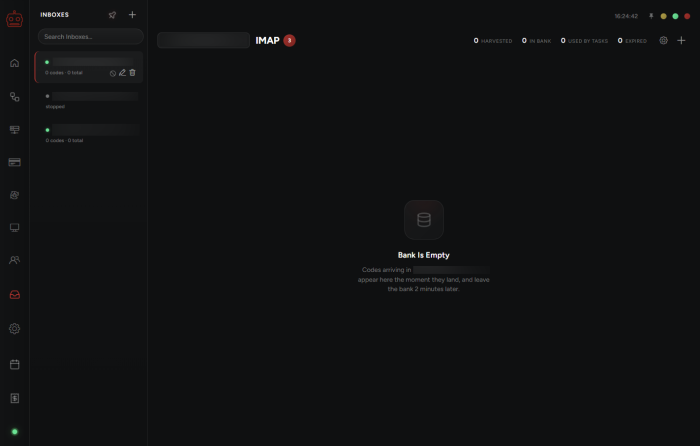
The IMAP tab centralizes email inbox connections so active tasks read incoming verification codes automatically. Moving the cursor to the left-hand sidebar menu and clicking the IMAP icon opens this workspace. Connected inboxes supply six-digit login tokens or payment confirmation numbers directly to running tasks. Operators never need to copy or paste security strings from a browser tab during a drop.
Online retailers frequently trigger single-use email challenges during account authentication and high-traffic checkout queues. According to Cloudflare bot traffic documentation, edge systems score request behavior and identity signals before allowing checkout progression. Storing valid inbox credentials alongside the store account management panel keeps session authentication organized in one local interface. Each verified inbox remains bound to its assigned store accounts across multiple release sessions.
How Do You Add an IMAP Email Account With the Plus Button?
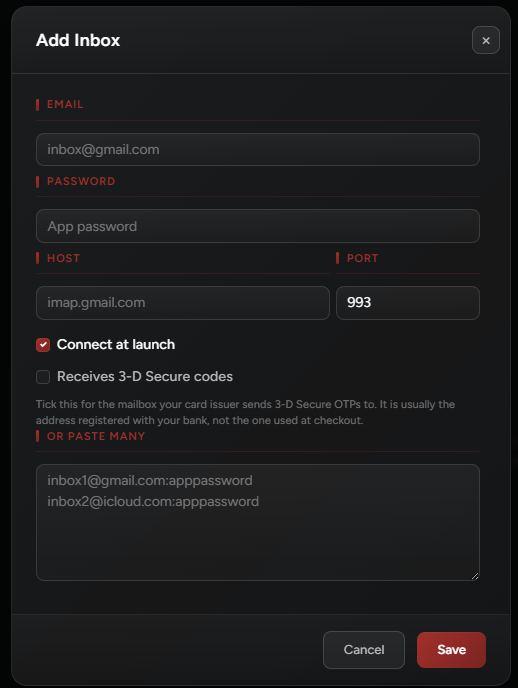
New email inboxes register through the plus button in the top corner of the IMAP workspace. A configuration modal appears where the operator enters the email address and the provider-generated application password. Once saved, tasks linked to that profile pull One-Time Passwords directly from the registered inbox row. The status column confirms whether the mail server accepted the TLS handshake.
The software enforces a strict uniqueness rule across all saved email records in the table. Operators cannot register the exact same IMAP email address multiple times inside the local database. Before entering credentials here, users must enable external mail access on their webmail account. Detailed steps for generating 16-character tokens appear in the provider IMAP setup guide for each host.
Which Email Provider Settings Work for OTP Extraction?
Four major webmail providers support standard SSL/TLS connections over port 993 for automated One-Time Password retrieval. Gmail, Outlook, iCloud Mail, and Yahoo Mail each require two-step verification on the parent account first. After enabling two-step security, the mail host issues a dedicated 16-character application password. Standard web login passwords fail authentication handshakes on modern mail servers.
Connection stability depends on staying within each mail host’s concurrent folder session limit during release windows. Assigning 1 dedicated catchall or main inbox per 5 to 10 checkout profiles prevents socket lockouts on port 993. Pairing clean mail credentials with the solver configuration reference keeps both security challenges and email tokens running smoothly. Testing inbox logins 15 minutes before a drop verifies that no application password has expired.
| Email Provider | Incoming IMAP Server Host | TLS Port | App Password Format |
|---|---|---|---|
| Gmail (Google Workspace) | imap.gmail.com | 993 | 16-character lowercase token |
| Outlook / Hotmail | outlook.office365.com | 993 | 16-character security password |
| iCloud Mail (Apple) | imap.mail.me.com | 993 | 16-character hyphenated key |
| Yahoo Mail | imap.mail.yahoo.com | 993 | 16-character generated passkey |
When Should You Enable the Receives 3-D Secure Codes Toggle?
The Receives 3-D Secure codes checkbox applies only when that inbox receives bank payment confirmation codes. Card issuers using 3-D Secure 2.0 protocols send a six-digit or eight-digit verification string by email. That code must be submitted before the issuing bank authorizes the checkout charge. Enabling this toggle instructs the task to scan incoming bank messages during payment submission.
Inboxes used solely for retailer account logins should leave the 3-D Secure toggle unchecked. Separating storefront login emails from banking challenge emails prevents parser conflicts when two messages arrive within 10 seconds. According to FTC online shopping guidance, multi-step payment verification protects cardholders and merchants during electronic transactions. Dedicated banking inboxes ensure the parser always extracts the correct authorization number.
How Do AYCD Inbox Keys and 2FA Site Lists Work?
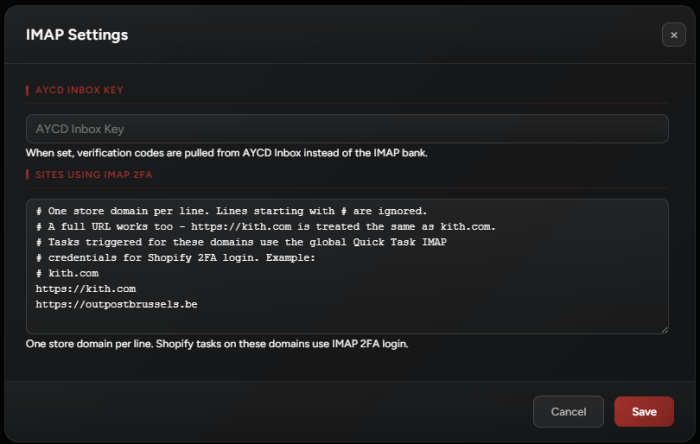
The IMAP Settings modal provides two global automation fields for external routing and Quick Task triggers. Those fields are the AYCD Inbox Key input and the Sites Using IMAP 2FA list. When an operator enters a valid AYCD Inbox Key, tasks query the AYCD Inbox API for codes. This option suits setups managing 25 or more mail accounts simultaneously.
Enable Receives 3-D Secure codes only for inboxes tied to bank checkout verification, and list specific 2FA storefront URLs so Quick Tasks attach email polling automatically.
The Sites Using IMAP 2FA field stores the domain URLs of retailers requiring email verification. Adding a domain here ensures that any Quick Task triggered from a monitor attaches IMAP polling automatically. According to Shopify API rate limit documentation, storefronts throttle excessive requests during high-traffic flash drops. Pre-loading 2FA URLs alongside custom Shopify storefront configuration eliminates manual edits during a drop.
| Verification Feature | Token Length | Typical Expiry Window | Configuration Location |
|---|---|---|---|
| Storefront Login OTP | 6 numeric digits | 180 to 300 seconds | Plus Button Account Modal |
| 3-D Secure Bank Code | 6 to 8 numeric digits | 120 to 180 seconds | Receives 3-D Secure Checkbox |
| AYCD Inbox Forwarding | 32-character API key | Persistent API session | IMAP Settings AYCD Key Field |
| Quick Task 2FA Trigger | Full HTTPS domain URL | Active across all monitors | Sites Using IMAP 2FA List |
How Do Automated Checkout Tools Handle Email Verification?
Multi-site desktop platforms handle email verification by combining direct port 993 socket polling with external inbox APIs. Platforms such as Valor AIO, Cybersole, and Stellar AIO include dedicated credential managers for parsing login tokens. Alongside those tools, NikeShoeBot desktop checkout software provides a unified IMAP tab with per-inbox 3-D Secure toggles. Operators can also filter Quick Task domains inside the same settings panel.
Before launching tasks on release day, operators should confirm that every email entry displays an active status. Checking that 2FA domain URLs match the exact retailer hostname prevents missed triggers during monitor alerts. Combining verified inbox credentials with automated task monitoring setup keeps profile authentication and Quick Task launches aligned. Every connected inbox then feeds verification tokens directly into its assigned task group.
Why does the client block adding the same email address twice?
Registering the same email inbox multiple times creates duplicate socket connections on port 993 and causes race conditions when two handlers mark the same One-Time Password message as read. A single entry can serve multiple checkout tasks without duplicating the inbox record.
Do I need both direct email credentials and an AYCD Inbox Key?
No, you only need one method per workflow. Enter individual email credentials via the plus button for direct server polling on port 993, or enter an AYCD Inbox Key in IMAP Settings if your mail accounts are already connected inside AYCD Inbox.