Categories: NSB Guides

Topps – NSB Guide

NSB supports the following regions for Topps:

ToppsDE, ToppsES, ToppsFR, ToppsIT, ToppsJP, ToppsUK, ToppsUS.


Task Creation

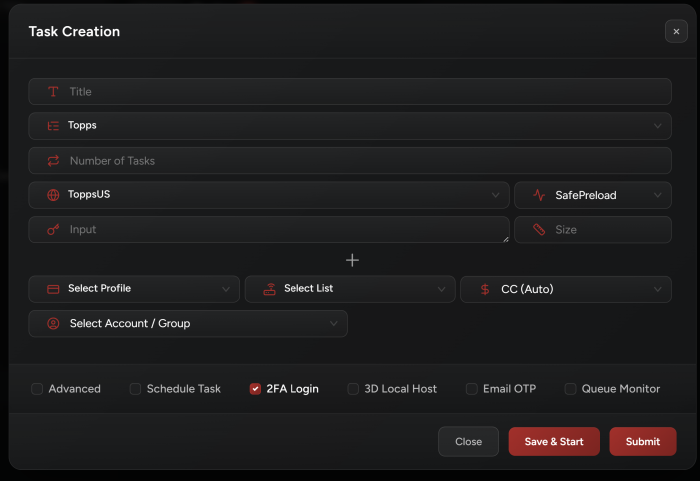
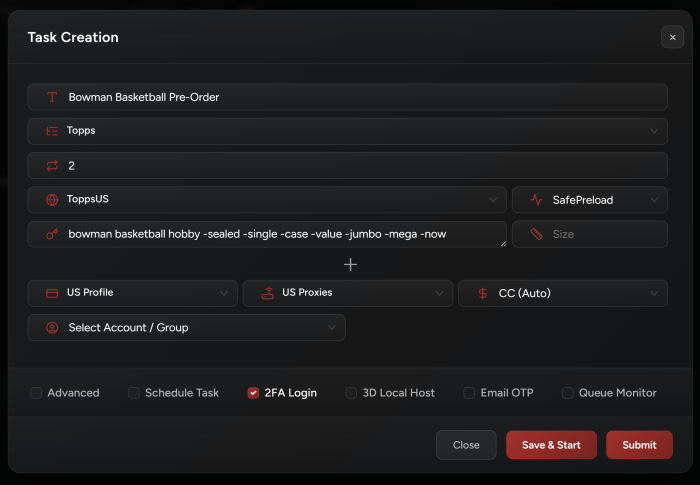
1.  Input:

  • For initial drops: use keywords.
  • For restocks: use direct links.


2.  Select SafePreload mode.


3.  Select your billing, proxies, and payment method.


4.  Starting Your Tasks:

Start tasks when queue goes live. Or run them 2–3 minutes before the drop.


5.  Accounts:

  • Do NOT enable login or 2FA.
  • NSB handles checkout without accounts: run guest mode tasks only.


6.  Captcha:

For EU regions, solve hCaptcha as fast as possible.


7.  Important Note:

Update your Chrome / Edge browser to the latest version. This is mandatory to pass Cloudflare properly.


Setup Example
Recent Posts

Travis Scott Nike Phantom 6 Is Ready to Take Over Football!

Travis Scott's partnership with Nike continues to expand beyond the world of lifestyle kicks. This…

2 hours ago

Nike Air Max 1000.2 Pink Spell Pushes 3D-Printed Kicks Ahead

The Nike Air Max 1000.2 is already proving that Nike's vision for 3D-printed footwear is…

24 hours ago

Pink Sneakers Are All the Rage Now & Here’s Our Take

Pink sneakers are having a major moment again, and it's not just a passing trend.…

2 days ago

Nike Caitlin 1 Is Ready to Make Signature Sneaker History!

Caitlin Clark's rise from college basketball sensation to professional superstar has been one of the…

3 days ago

The Comme Des Garçons Jordan 11 Is Black-Tie Event Ready!

Jordan Brand's collaboration roster is the gift that keeps on giving. And one of the…

4 days ago

Here’s Why You Need a Pokemon Center Bot & Where to Get It!

Few franchises in history have achieved what Pokémon has. What started as a video game…

5 days ago