NikeShoeBot guide
Supreme guide
NikeShoeBot supports Supreme for US, UK, EU, JP, KR, and any Supreme signup region.
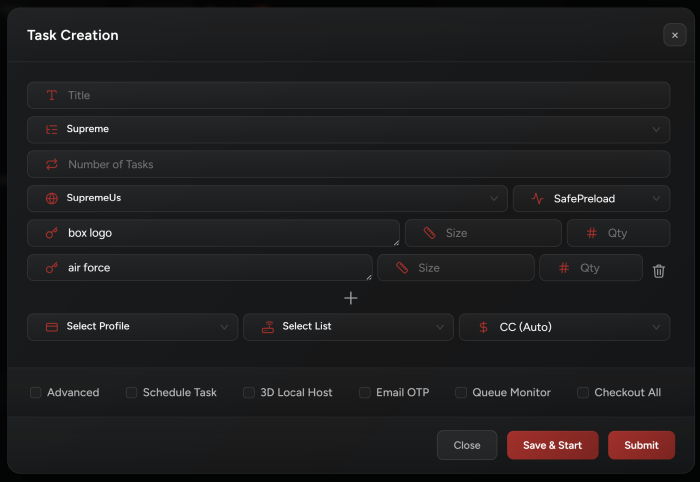
Task Creation
-
Select Mode:
Focus SafePreload mode.
-
Select your Size:
• Both Supreme sizing
small, large, xlargeands, l, xlwork fine.• You can use the size that is available on the site (e.g. small, large, xlarge, xxlarge, etc.), or keep the field empty if size doesn’t apply.
• Multiple sizing works, just separate them by a comma
,. -
Supreme Multi Carts:
• Add each item to a separate field.
• Or you can use the legacy method where you can enter all keywords in a single input field by separating your keywords with
;and putting your sizes between[size]. Your input should look like this:box logo hooded grey[m]; box logo tee black[xl]. -
Checkout All option:
This feature is for Supreme Multi Carts, if you use it then NikeShoeBot will only checkout if all items in the input are available. Without it NikeShoeBot will checkout any item that is in the cart and disregard any item that is out of stock.
Release Tips
-
Start your tasks when the queue goes up.
-
Ensure your NikeShoeBot has your Capsolver / AYCD keys saved and connected.
-
Sign in to multiple Gmail accounts on your NikeShoeBot local solvers.
-
Make sure you are using valid phone numbers.
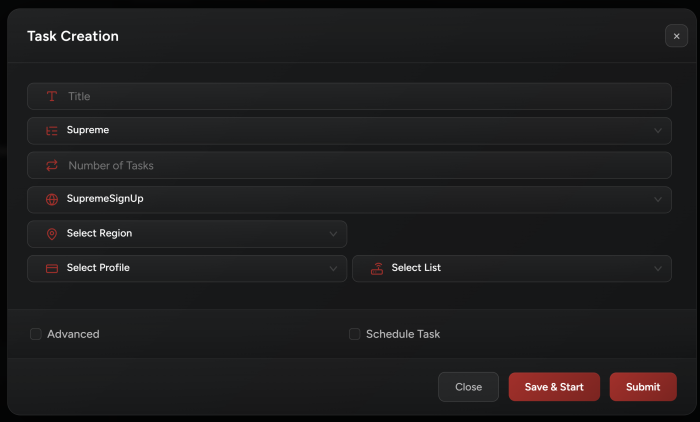
Supreme Sign Up
All Supreme signup regions are supported by NikeShoeBot.
When creating a task for Supreme signup make sure to select your region, for now we support these regions: Seoul, Shanghai, London, Paris, Milano, Berlin, Brooklyn, Chicago, Los Angeles, Manhattan.