NikeShoeBot guide
Pokémon Center guide
NikeShoeBot supports the following regions for Pokémon Center (based on the billing profile assigned to the task):
US, CA, UK, DE, and AU (Manual checkout only for AU).
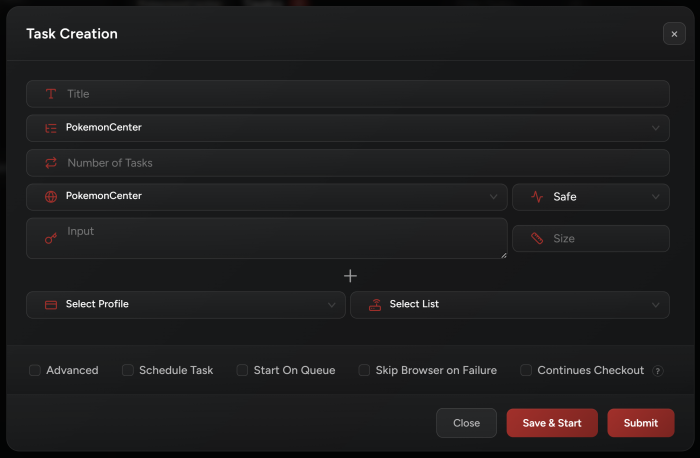
Task Creation
-
Input:
Enter the item PID (or item URL).
-
Size:
Keep size field empty.
-
Proxies:
High quality proxies are required, you may use ISPs or Residentials (DCs almost have no chances of passing).
-
Start On Queue:
If enabled, all you have to do is create your tasks. Now, once the queue is live, NikeShoeBot will auto-start these tasks.
-
Skip Browser on Failure:
This option will skip opening a browser on declines automatically, instead it will show the following option to open the browser manually:

- Continuous Checkout:
Once enabled, you will be able to select a billing group and assign it to task. This will allow the task to use a new profile from this group every time if completes a checkout (linearly). - Advanced Settings:
Click Advanced to enter Delays (keep them at default unless we provide other instructions).

PKC Modes
Note: You can enter multiple inputs per task by hitting the + button under the input field.
-
Safe Mode:
-
NikeShoeBot will open a browser for each task to pass queue.
-
Once passed queue, the task will close the browser and continue to complete checkout.
-
The number of browsers opened simultaneously can be configured in NikeShoeBot settings tab (Browser settings, Browser Limit field).
-
-
Request Mode:
-
Task won’t open a browser.
-
It will pass queue and complete the checkout via request flow.
-
These tasks will be waiting for the Queue Monitor task to trigger that the queue is live.
-
- TestProxy:
-
This mode will allow you to test your proxies on PKC to make sure your proxies work smoothly prior to drop time.
-
- NewsLetter:
- Requires account.
- This mode will subscribe the selected account to site’s newsletter.
- Register:
- Requires account.
- This mode will register the selected account on site.
Setup For Drops
-
Create your tasks with empty input (unless you already know what item is dropping).
-
The best setup is to run as many requests Mode tasks as you want.
-
Once you know what the SKU dropping is, you may inject it by using (ctrl+i) or by clicking the pen icon in top right corner then clicking on MultiCart button.
-
NikeShoeBot will try to solve captchas automatically, but you have to keep an eye on any opened browser as you may need to solve captchas.
-
If you decided to run some few safe tasks, keep in mind that once the task manages to pass queue, browser will close automatically emptying a spot for other waiting safe tasks.
-
After passing queue, the task will attempt to checkout (except for AU). In case the task failed to complete checkout, a browser will be opened so you can manually complete it.
-
ISPs are recommended on PKC.
Note: Getting requeued is normal when running tasks.