NSB supports the following regions for Apple: US, CA, UK, DE, JP, CN, IN, HK, SG, AE.
What We Support
- Guest checkout:
No Apple ID, 2FA, or saved details required.
Leave the username and password fields empty to use the guest checkout flow.
- Delivery & in-store pickup:
Including postcode-based store search and collection-slot selection.
- Flexible task input:
Use either the product link or the bare SKU.
- Business orders:
Simply add a business name to the task.
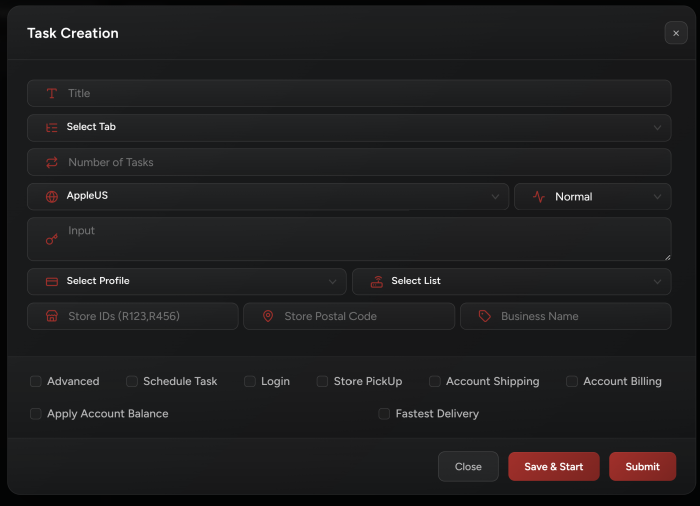
Task Creation
- Select your region:
Choose the Apple regional site for the store you want to purchase from.
- Add your product:
Paste the product link or enter the bare SKU in the product field.
- Use Guest Checkout:
Leave the username and password fields empty. This tells the task to use the guest checkout flow.
- Select a profile:
Your profile must include a valid email, name, address, phone number for the selected region, and payment card.
- Set your quantity:
The default is 1. Apple applies purchase limits per profile.
Requesting too many units may cause the order to be rejected.
- In-store pickup:
Enable pickup and enter a postcode.
You can also limit the search to specific store IDs and set a search radius.
- Proxies:
Use proxies that match the selected region.
Apple may throttle connections, and the task can rotate proxies when access issues occur.
Profile Notes
- Avoid iCloud email addresses:
Apple may reject iCloud addresses for guest orders.
Use another valid email if you receive:iCloud email not allowed — use another email
- India phone numbers:
Numbers are automatically formatted asXXXXX XXXXX.
However, the number must still be a valid 10-digit mobile number.
Invalid numbers may cause the shipping page to reload and display:Unexpected response! Retrying...
- China store search:
Enter the numeric postcode rather than a city name.
- Card expiry:
Enter the expiry date asMM/YY. The engine automatically trims four-digit years when necessary.
Regions and SKUs
Every region sells its own part numbers. Copy the SKU off that region’s Apple site; the suffix tells you where it belongs.
A US part number on the India store finds nothing.
- Region: United States
Site key: AppleUS
Store: apple.com
SKU ends: LL/A
Example: MDHH4LL/A
- Region: Canada
Site key: AppleCA
Store: apple.com/ca
SKU ends: LL/A
Example: MDH74LL/A
- Region: United Kingdom
Site key: AppleUK
Store: apple.com/uk
SKU ends: B/A
Example: MDHE4B/A
- Region: Germany
Site key: AppleDE
Store: apple.com/de
SKU ends: D/A
Example: MDHA4D/A
- Region: Japan
Site key: AppleJP
Store: apple.com/jp
SKU ends: J/A
Example: MDVH4J/A
- Region: China
Site key: AppleCN
Store: apple.com.cn
SKU ends: CH/A
Example: MDVH4CH/A
- Region: India
Site key: AppleIN
Store: apple.com/in
SKU ends: HN/A
Example: MDVD4HN/A
- Region: Hong Kong
Site key: AppleHK
Store: apple.com/hk
SKU ends: ZP/A
Example: MDVD4ZP/A
- Region: Singapore
Site key: AppleSG
Store: apple.com/sg
SKU ends: ZP/A
Example: MDVD4ZP/A
- Region: UAE
Site key: AppleAE
Store: apple.com/ae
SKU ends: AB/A
Example: MDV94AB/A