GENERAL FAQ
If you forget to deactivate your bot or downloaded the bot on a server and lost the server then make sure to:
DM !reset to @NSB bot
The bot will automatically detect the latest active key that is linked to your discord and reset it.
If more than 1 active keys are linked to same discord, you will have to specify which key to reset: !reset yourlicensekeyhere.
Yes you can do that by integrating that group’s monitor into the bot under Monitors tab. Then you’ll be able to use it within the bot and link tasks to it as well.
Check out Integrating Monitors for more info.
We have recently changed our publish method for our updates as part of our scaling process & have added additional backup links for updates to ensure smoother & faster updates to all our users!
We also added a notification to the Settings tab that will notify you in case the bot is not on the latest version.
If you are on an outdated version, yet when you click “Check for updates” in the Settings tab you get that there is no update required, please make sure to download the latest version directly from #download-links channel. If at any time there was an update announcement and the bot did not auto update, make sure to download manually from one of the links there and you should be good to go!
Proxy Types
There are two different types of proxies. Residential (RESI) and ISPs / Data Center (DC). It is recommended for Nike to use ISPs since they are usually quicker and do not get banned as easily. Residential proxies are mainly for Shopify sites with bot protection.
Check out #proxy-steals and #groupbuys discord channels for some of our proxy partners.
Location
Ideally, you would want to have your proxies closest to the location of where your bot is if on a server or if running locally you would want proxies closest to Shopify Servers (New York or Chicago). Meaning if it’s on a server in Virginia you would want proxies from Virginia, or if you are just running from your computer in Texas ideally you would want proxies that are based in New York or Chicago.
Typically, proxies come in locations in New York, Virginia, and Chicago. We have a lot of trusted proxy providers in #proxy-steals channel so be sure to check them out!
Checkout only once: The bot will checkout just once using this profile.
Checkout once per site: The bot will checkout only one time using this profile on a certain site (so for example if you are using same billing profile on 2 sites, it will checkout only once on each site the billing is being used on).
Checkout once per item per site: The bot will checkout only once using this profile on a certain site and item (so for example if you are using same billing profile for multiple tasks on Supreme, if you checked out a bogo, it won’t use this card again on a bogo, but it will still use it for other items on the same site).
You need the new C++ download, make sure to install the 64bit version from this link:
https://support.microsoft.com/en-us/help/2977003/the-latest-supported-visual-c-downloads
NIKE FAQ
Yes we do! NSB includes the industry’s most powerful and advanced Nike SNKRS module that supports SNKRS US, EU, GS, KR, and JP, with more to come.
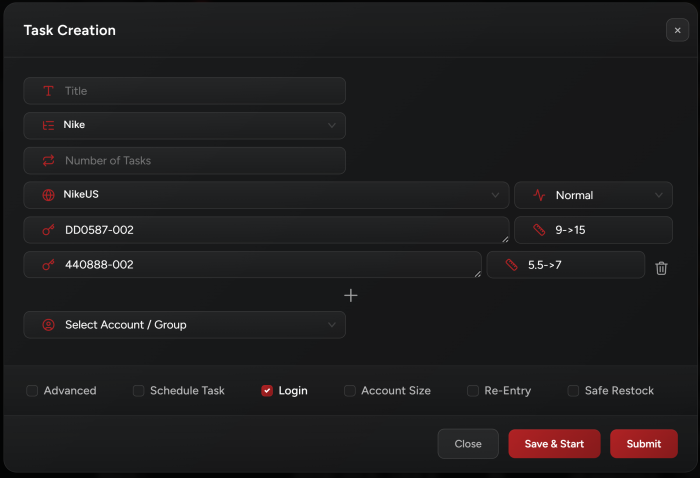
Yes we support running multi-SKU on 1 task! You can create 1 task for every account that has all the SKUs that are dropping in its input field.
You may enter each SKU in a new input field and specify the desired SKU size in the size field next to it.
When running multiple SKUs, it will open ONLY ONE browser for ONE of the products, don’t worry about that. It is perfectly normal and on drop time it will submit entries for ALL SKUs.
Note 1:
You may use the legacy method to enter the SKUs separated by a semicolon in a single input field, for example: DN9782-001; DX8554-001; DR6952-400.
In this case, you need to specify which size you want to run for multiple SKUs. You should follow this format when inserting your SKUs: sku1 [size1, size2]; sku2 [size3, size4]; sku3[size5].
You can enter multiple SKUs with empty size option for random sizes like so: sku1 [size1, size2]; sku2; sku3[size3]
Note 2:
Mutliple SKUs work also on Shopify and Asos.
Example:
3. What is the “Browser Blocked” error for account log in?
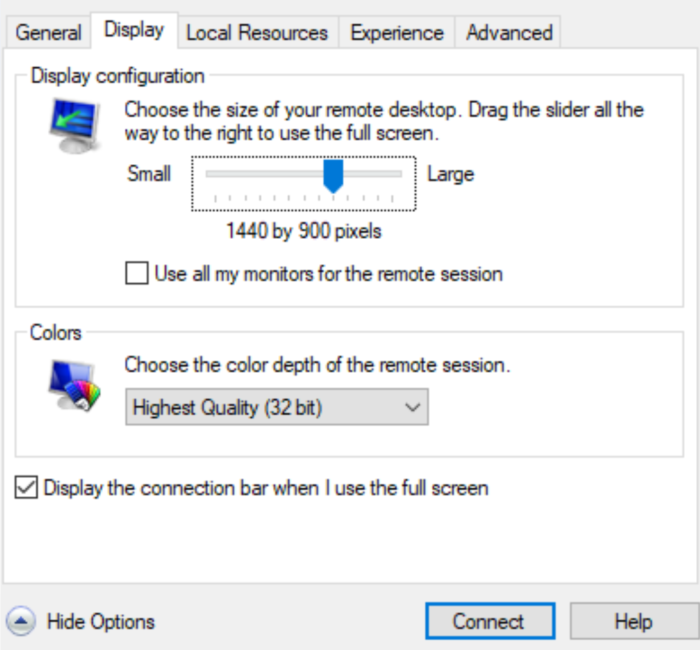
If you are getting this error: “Browser Blocked” when logging in to your Nike accounts or running your Nike tasks, try to change the resolution before connecting to your server (if running on server), or maximize the opened chrome windows if running on local.
Example of changing resolution when connecting to server:
SHOPIFY FAQ
Just spaces, plain & simple. The item’s title should contain all the words you have set in your keywords to get picked up. Here are some notes:
-
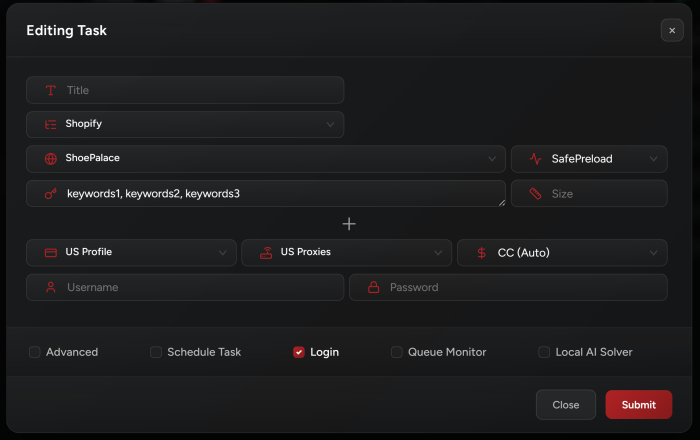
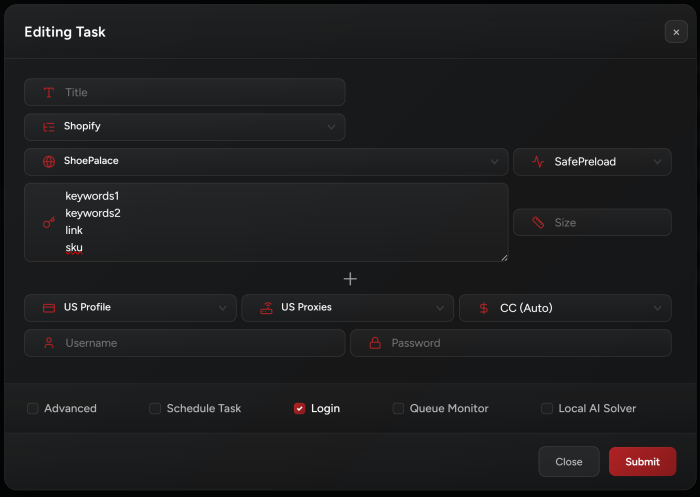
You can separate each input with a comma or enter multi-line input (check the images below for examples).
-
Keep in mind that commas mean OR so when you separate 2 words with a comma (for e.g. jordan, 1) it means you are searching for a product with the kw jordan or 1, not both.
-
You should not use +
-
For e.g. +jordan, +1, +high, +navy, -ps, -td, -gs, -kids should be jordan 1 high navy -ps -td -gs -kids.
-
Be as specific as possible to avoid picking up the wrong product.
-
You can always use a false profile to test your kws if you’re unsure.
Keywords separated by a comma:
Multi-line input:
Separate fields input:

The most common is that you forgot a dead proxy on your captcha window. Make sure to remove it or to replace it with a fresh working proxy!